
Moving a Home Office Setup: The 2026 Professional Relocation Guide
- nadineharoon
- Jun 10
- 11 min read
For the modern professional, a week of digital downtime is often more expensive than the physical relocation itself. You've spent years curating a workspace that fosters peak productivity, and the thought of a cracked monitor or a tangled nest of cables is enough to stall any career move. Successfully moving a home office setup requires more than just bubble wrap; it demands a strategic operational plan. You understand that your equipment is the engine of your business, and any disruption to that engine directly impacts your bottom line.
We've designed this 2026 guide to help you safeguard your professional gear and maintain total business continuity during a long-distance relocation. You'll learn how to navigate current e-waste regulations and secure your sensitive data according to the latest federal standards. We provide a clear, methodical system for organizing your hardware so that your new workspace is operational on day one. From protecting high-value electronics to managing complex cable configurations, this expert strategy ensures your transition is efficient, secure, and entirely damage-free.
Key Takeaways
Treat moving a home office setup as a specialized logistics operation rather than a standard room move to prevent hardware damage and lost income.
Protect your digital and physical assets by implementing the 3-2-1 backup rule and keeping essential documents in a portable, secure file box.
Use anti-static materials and original packaging to safeguard delicate electronic components and ergonomic gear during long-haul transit.
Eliminate professional downtime by coordinating with internet providers 30 days in advance and preparing a mobile bridge workspace for the transition.
Leverage climate-controlled logistics and expert packing services to ensure your sensitive equipment remains in perfect working order upon arrival.
Table of Contents
Understanding the Complexity of Moving a Home Office Setup
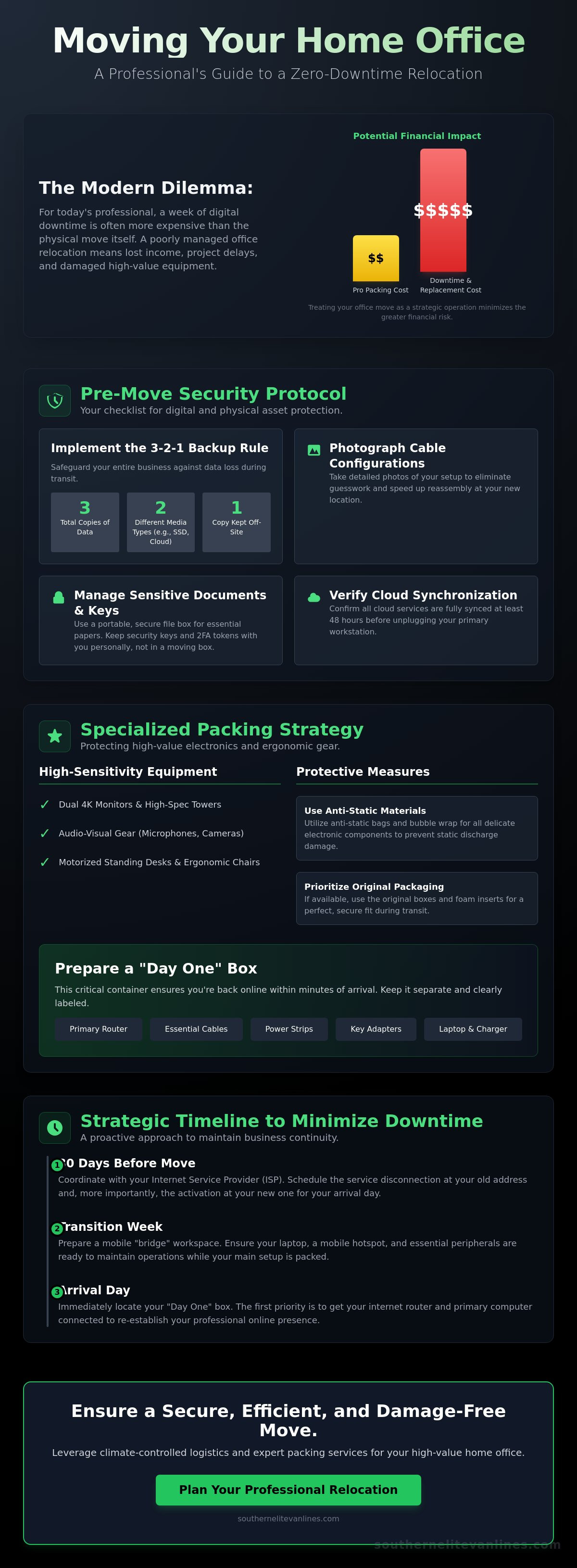
A home office is no longer just a secondary workspace; it is the central hub of your professional life. When you approach moving a home office setup, you aren't just shifting furniture. You are managing a specialized logistics operation where the stakes involve both high-value hardware and the continuity of your income. In 2026, the complexity of these setups has reached a new peak. Understanding the rise of home offices helps explain why these spaces now mirror corporate data centers in their technical density. Your primary goal is a seamless transition that preserves your equipment and your schedule.
The financial impact of a poorly managed move is twofold. First, there is the direct cost of replacing damaged hardware. Second, and often more significant, is the cost of downtime. If your workstation is offline for several days, that represents lost billable hours or missed project deadlines. Treating moving a home office setup as a strategic business task rather than a household chore is the first step toward a successful relocation. This mindset shift ensures that every cable, drive, and ergonomic component receives the attention it deserves.
The High-Value Nature of Modern Workspaces
Modern professionals use tools that require meticulous handling. Your inventory likely includes dual 4K monitors, high-spec towers, and audio-visual gear. Ergonomic investments have also evolved. Moving a motorized standing desk or a precision-engineered chair requires different protocols than moving a dining table. Standard residential packing often fails because it doesn't account for the sensitivity of professional-grade electronics. A single jolt can misalign internal components, leading to replacement costs that exceed the price of professional packing.
Digital vs. Physical Assets: A Dual-Track Strategy
Treat your hardware and your data as two distinct yet vital assets. While physical protection prevents broken screens, digital security ensures you don't lose years of work. Identify mission-critical items for day-one operations, such as a first-open box. This container should hold your primary router, essential adapters, and power chargers. Separating these from the bulk of your equipment ensures you get back online within minutes of arriving at your new destination, maintaining your professional presence without interruption.
The Essential Pre-Move Protocol for Digital and Physical Security
Security is the foundation of a successful office relocation. You can't afford to lose client data or sensitive legal documents during the transition. Establishing a pre-move protocol ensures that when you're moving a home office setup, your digital life remains as secure as your physical equipment. This phase requires a methodical approach to redundancy and documentation to prevent any lapse in your professional standards.
Implement the 3-2-1 backup rule immediately. This strategy dictates that you maintain three copies of your data, stored on two different types of media, with one copy kept offsite. For example, keep your primary files on your computer, a secondary copy on an encrypted external drive, and a third in a secure cloud environment. This redundancy protects your business against hardware failure or physical loss during transit. It's a simple step that provides immense peace of mind.
Before you unplug a single device, take high-resolution photos of your cable configurations. These visual guides are invaluable for replicating your Ergonomic Home Office Setup in the new location without the frustration of trial and error. Additionally, audit your physical security keys and 2FA tokens. Keep these items in your personal bag rather than a packing box. Staying in control of your access credentials prevents you from being locked out of essential accounts on your first day in the new space.
Data Redundancy and Cybersecurity
Cloud synchronization must be verified and active at least 48 hours before the move. If you're decommissioning old hardware, follow "cradle-to-grave" tracking requirements for hazardous electronic waste. Securely wipe all sensitive data to comply with state and federal identity theft protection acts before disposal. Ensure your VPN and security protocols are updated to recognize your new network environment so you can resume work immediately and safely.
Confidential Document Management
Physical papers require a high level of care. Sort your documents into three distinct categories: shred, archive, and active. Place active files in a locked file box that stays with you during the journey. For documents that require long-term protection, utilizing full packing services ensures that even your most sensitive archives are handled with professional exactness. Use tamper-evident seals on boxes containing private client information to maintain a clear and secure chain of custody throughout the relocation.
Specialized Packing Techniques for Delicate Hardware and Ergonomic Gear
Precision packing is the only way to ensure your professional tools survive a long-haul journey. When moving a home office setup, the "Original Box Rule" is your gold standard. Manufacturers design these containers with custom-fit foam inserts that provide the exact clearance needed for safe transit. If you've discarded the original packaging, you must recreate this environment using heavy-duty double-walled boxes and high-density foam. Avoid standard residential packing tape; use reinforced filament tape to ensure boxes remain sealed under the weight of professional gear.
Static electricity is a silent threat to your productivity. Standard bubble wrap can generate a charge that fries delicate circuits. Always use pink anti-static packing materials for any exposed components or motherboard-heavy devices. Your labeling protocol should be just as precise. Instead of marking a box as "Office," specify "Workstation 1: GPU and Drive Array" or "Primary Desk: Motorized Frame Hardware." This level of detail eliminates the stress of searching through dozens of containers when you're trying to hit a project deadline in your new location.
Protecting High-End Electronics
Monitors require more than just a layer of wrap. Cover the screen with a non-abrasive microfiber cloth before adding a layer of cardboard to prevent pressure cracks. Pack monitors vertically, never flat, and use "This Side Up" indicators. For high-performance PCs, consider removing the Graphics Processing Unit (GPU). These heavy components can snap off the motherboard during the vibrations of a long-distance move. Secure all cables in anti-static bags and bundle them with velcro ties rather than plastic zip ties to prevent insulation damage.
Ergonomic Furniture and Standing Desks
Motorized standing desks are precision instruments. Before disassembly, lower the desk to its lowest setting to protect the lifting columns. Remove the control box and handset, wrapping them separately to prevent impact damage. For high-end ergonomic chairs, avoid stacking items on top of the seat or backrest. This prevents frame warping and maintains the integrity of the mesh or leather. If you have an oversized or extremely fragile centerpiece, custom crating provides a level of security that standard boxes cannot match, ensuring your ergonomic investment arrives in perfect calibration.
Strategic Planning to Minimize Professional Downtime
Downtime is the primary enemy of any remote professional. While physical safety for your gear is vital, maintaining your presence in the digital marketplace is equally important. Strategic planning ensures that moving a home office setup does not result in a week of silence for your clients. You must treat the transition period as a bridge, where a temporary workspace keeps your projects moving while your main workstation is in transit. This requires a methodical timeline that starts weeks before the moving truck arrives.
Schedule your office as the "last out, first in" priority for your relocation team. By packing your workspace last, you maximize your billable hours at your current location. Upon arrival, ensuring your office gear is the first off the truck allows you to begin the reassembly process immediately. This logical progression minimizes the gap between your old and new environments. To execute this effectively, communicate your priorities clearly to your moving crew during the initial walkthrough.
Professional communication is your best tool for managing expectations. Notify your clients and stakeholders at least two weeks before your move date. Provide a clear window of limited availability and set an automated out-of-office response that includes your return-to-work date. This transparency builds trust and prevents the stress of urgent requests hitting your inbox while you are halfway across the country. If your relocation requires a more complex timeline, Southern Elite Van Lines can help you coordinate a logistics plan that aligns with your professional deadlines.
Connectivity and Infrastructure Setup
Internet connectivity is the lifeblood of the modern office. Coordinate with ISPs at your destination at least 30 days in advance to verify fiber or high-speed availability. Do not assume the infrastructure is ready; hardware lead times for new installations can be significant. Once you arrive, test every outlet and circuit breaker in your designated office space. High-performance workstations and server arrays can draw substantial power, and you need to ensure the local electrical system can handle the load before you plug in your gear.
The Transitional Workspace
Prepare a "Day 1 Office Bag" that stays with you at all times. This should include your laptop, noise-canceling headphones, and all essential power adapters. This kit, paired with a mobile hotspot, allows you to handle emergency emails or attend critical meetings from anywhere. For non-essential items like bookshelves or office decor, consider using short-term storage. This allows you to focus exclusively on your core workstation setup during the first few days, preventing the clutter of unpacked boxes from distracting you during your first week back at work.
Elevating Your Move with Professional Packing and Long-Distance Logistics
Long-distance transit presents unique environmental challenges that local relocations simply don't face. When you're moving a home office setup across multiple states, your equipment is exposed to varying humidity levels and extreme temperature fluctuations. Climate-controlled transit is a critical safeguard for sensitive electronic components, preventing the condensation or overheating that can occur in standard trailers. Professional long distant movers utilize specialized equipment and logistics planning to mitigate these risks, ensuring your hardware arrives in the same condition it left.
Investing in full-service packing is a calculated decision for business continuity. It shifts the liability and the labor to experts who understand the exactness required for high-end office assets. Comprehensive inventory management provides a level of tracking that prevents the loss of small but vital components, like specialized server screws or proprietary adapters. This methodical approach ensures that every item is accounted for, providing you with the peace of mind needed to focus on your professional responsibilities rather than logistical minutiae. By trusting a steady, expert hand, you eliminate the risk of a disorganized setup in your new destination.
The Southern Elite Advantage for Professionals
We bring a specific standard of moral character and precision to every relocation. Our experience in commercial relocation is directly applied to your home office, treating your workspace with the same rigor we apply to corporate headquarters. We use professional-grade packing materials that exceed industry standards, ensuring meticulous care for every 4K monitor and high-spec tower. This level of service transforms a complex interstate move into a shared journey toward your new professional chapter, where excellence is the only acceptable outcome.
Seamless Transition to Your New Professional Chapter
Reducing the emotional and physical burden of a cross-country move allows you to step into your new home with clarity and energy. Our team manages the heavy lifting and technical logistics, ensuring your office arrives exactly as it was. You've built a career on reliability and excellence; your move should reflect those same values. We're committed to your satisfaction and the safety of your professional tools. When you're ready to secure a damage-free transition for your workspace, contact us to request a professional quote for your home office relocation. We're here to ensure your new beginning is effortless and productive.
Launch Your New Workspace with Absolute Confidence
Relocating your career is a significant milestone that requires a balance of technical precision and strategic foresight. By prioritizing digital redundancy and utilizing specialized hardware protection, you ensure your essential tools remain functional throughout the journey. A successful transition depends on a methodical approach to infrastructure and a commitment to maintaining professional continuity from the first day in your new home.
Successfully moving a home office setup doesn't have to be a source of professional disruption. When you partner with experts who provide nationwide long-distance moving expertise, you gain access to specialized packing for high-value office electronics and climate-controlled storage and transit options. These safeguards are specifically designed to protect your investments and your peace of mind during a complex relocation.
Secure your professional workspace with a free moving quote from Southern Elite Van Lines today.
Your new office is more than just a room; it's the foundation of your future success. We're ready to help you build that foundation with the care and exactness your career deserves. Let's make your next professional chapter your most productive one yet.
Frequently Asked Questions
How do I pack a dual-monitor setup for a long-distance move?
Pack each monitor vertically in its original box or a heavy-duty electronics container. Cover the screens with microfiber cloths and a layer of cardboard to prevent pressure marks. Use custom-fit foam or high-density padding to ensure the screens don't shift. Always mark these boxes with "This Side Up" and "Fragile" to guide the movers during loading and transit.
Should I take my standing desk apart before the movers arrive?
Yes, you should disassemble the desktop from the motorized frame to prevent structural damage. Lower the desk to its lowest setting before unplugging the power. Remove the control box and handset, wrapping them separately in anti-static material. Keep all screws and small hardware in a labeled bag taped to the frame so reassembly at your new destination is immediate and stress-free.
What is the safest way to transport a high-end gaming or workstation PC?
Remove the graphics card and any large air coolers before packing your tower. These heavy components can snap off the motherboard due to vibrations during long-distance travel. Pack the tower in its original box with the factory-provided foam. If that isn't available, use a double-walled box and fill all gaps with anti-static packing peanuts to prevent the internal components from moving.
How far in advance should I schedule my internet installation at the new house?
Contact your new service provider at least 30 days before your move date. Lead times for fiber installations or technician visits can be significant, especially in high-demand areas. Verifying high-speed availability early ensures you have the necessary infrastructure to resume work on your first day. Don't wait until you arrive; secure your installation slot as soon as your move date is confirmed.
How can I protect sensitive client documents during a move?
Keep physical client files in a locked "essentials" box that stays in your personal vehicle. Don't pack these with your general household goods. Use tamper-evident seals to ensure the chain of custody remains intact. For digital files, verify that all external drives are encrypted and that your cloud backups are fully synced at least 48 hours before the moving truck arrives at your home.
Is it worth keeping original boxes for office electronics?
Yes, original packaging is the most effective tool for moving a home office setup safely. Manufacturers design these boxes with custom foam inserts that provide the exact clearance required for sensitive hardware. If you've discarded them, use professional-grade electronics boxes and high-density foam. This investment in quality materials is far less expensive than replacing a high-end monitor or a precision-engineered workstation.
How do I minimize downtime if I work remotely during the move?
Plan a bridge workspace that includes your laptop, essential chargers, and a mobile hotspot. This setup allows you to handle critical tasks while your primary equipment is in transit. Notify your clients of your move window two weeks in advance to manage expectations. Scheduling your office as the last room packed and the first room unpacked ensures your professional environment is restored with minimal interruption.
What should be in my Day 1 Office Essentials box?
Your essentials box should contain your laptop, primary router, power adapters, and noise-canceling headphones. Include any physical security tokens and a basic toolkit for reassembling your furniture. Keep this box with you rather than on the moving truck. Having these items accessible allows you to establish a functional workspace immediately, even if the rest of your home remains in boxes for several days.


Comments